Innovative Tech in Education – A Reflection

My second master course (Adapting Innovative Technology to Education) is coming to an end, so it is a good time to reflect on my learning journey in it especially how it affected my professional life.

Since my main interest revolves around computer science in K-12, I am involved in outreach events. In my current project, we use a friendly-to-code environment to introduce programming, Alice. In our next outreach, we prepared games and simple programming activities in using this tool. Although the concept is attractive, we need something more catchy to the young audience to have an impact on their view of Computer Science.

While taking this course, I came to try the Makey Makey (Finally!) and saw dozens of applications of this tool. The interesting part was to actually use it in Alice programming. So I presented the idea to my team: created a few games in Alice, and had some creative input using Makey Makey. They loved it! So we decided to use it for our outreach.

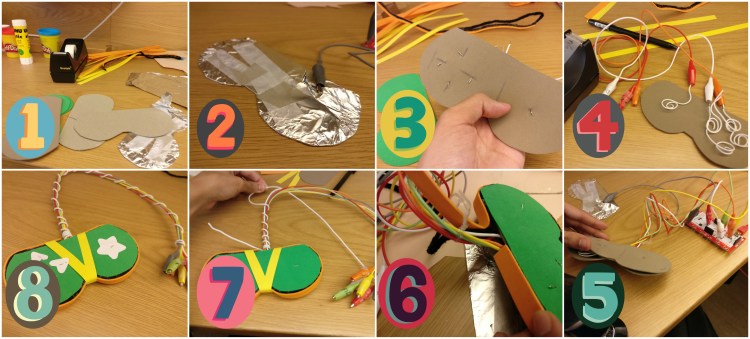
We used Makey in more than one way: Joystick, Horse riding game, and mouse & cat game. Let’s take the Joystick as an example, here is how I made it:

BeFunky Collage.jpg
How to make a joystick with the Makey Makey

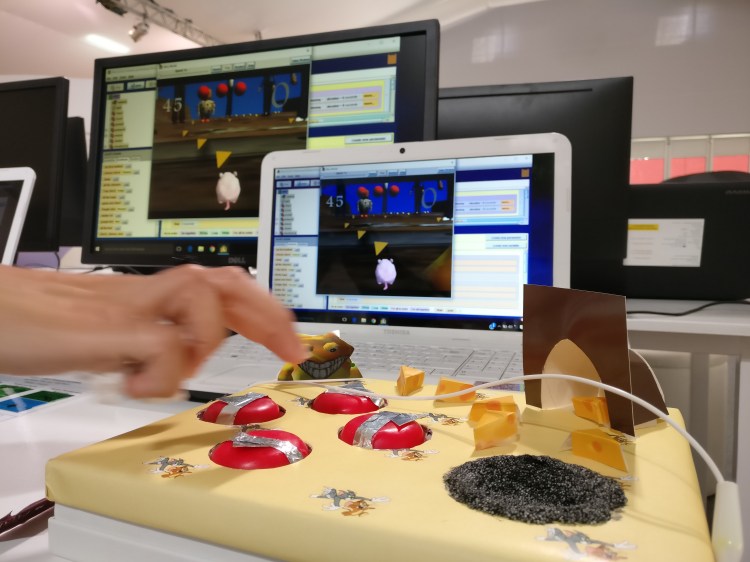
Also, here is how the other two games look like:

IMG_20161208_143939.jpg
Mouse & Cat game
IMG_20161208_143956.jpg
Horse Riding Game

Here is a video of creative joystick in action. I took it of my colleague (as opposed to young students) due to permission issues.


On Assessing Creativity in Computer Science

“With freedom come responsibility”. This is what my boss tell teachers who go through our teacher training to intro to Computer Science course. Well, the same say applyes to any project based learning (PBL). Because when the students get more room of choice, the teachers -by default- assume less responsibility. Hence, PBL is a great way to push students to their potential of creativity and steepen up their learning curve. But that comes with a price. The teacher is now assuming the role of a coach (Isslehardt, 2013) where the responsibility of learning transfers to the students, which is not exactly a straightforward process. It has to be gradual. It has to be smooth.

I think programming in of itself pushes one to think creatively. Applying it in the context of making just makes the whole experience much more interesting and creative. If I would assign a project based programming assignment, it would be game development where the user need to interact with anything other than mouse and keyboard. The latter rule can be accommodated by providing Makey Makey , a tool that makes almost anything a keyboard. To be precise, the main criteria on assessing this programming project will be:

1- Create a game that a 4 year old would be able to play

2- The game is fun with creative input, so that a middle-aged person would want to try! (hint: you can use Makey Makey)

3- The game functions well, that a peer student cannot catch a single bug.

In this way, the students are given the freedom to work on something they are passionate about, and they will need to think outside the box to related to the different age groups that might play with their game. Of course their coding skills will be put to test to create a fully functional game.  

Inspired from Wiggins (2012) and his insights on assessments, the assessment is made concise. Yet, it looks at the Impact and creativity of the project, by making sure the audience actually play the game “whether or not it is fun or boring”. The assessment criteria also clarifies the purpose of the project, as Wiggins puts it “to make clear that the purpose is to cause an intrinsic effect, NOT please the teacher”.

Stressing on the idea of teachers acts like a coach, Isslehardt explains how important it was for the teachers to have a day-to-day base-touch with students, to make sure they are progressing in their projects. It is expected that students might not have the discipline to take progressive actions when meeting an obstacle. Hence, the teacher should act her role of following up, guiding and supporting her students.

Just like Gee’s reflection on the power of videogames in his own childhood (like many of us experienced), I believe it is even more effective to allow students create that experience for someone else, as it will be an incentive to flourish their creativity.

References:

Wiggins, G. (2012, February 3). On assessing for creativity: yes you can, and yes you should. [Web log comment]. Retrieved from http://grantwiggins.wordpress.com/2012/02/03/on-assessing-for-creativity-yes-you-can-and-yes-you-should/

Isslehardt, E. (2013, February 11). Creating Schoolwide PBL Aligned to Common Core [Web log comment]. Retrieved from http://www.edutopia.org/blog/PBL-aligned-to-common-core-eric-isslehardt

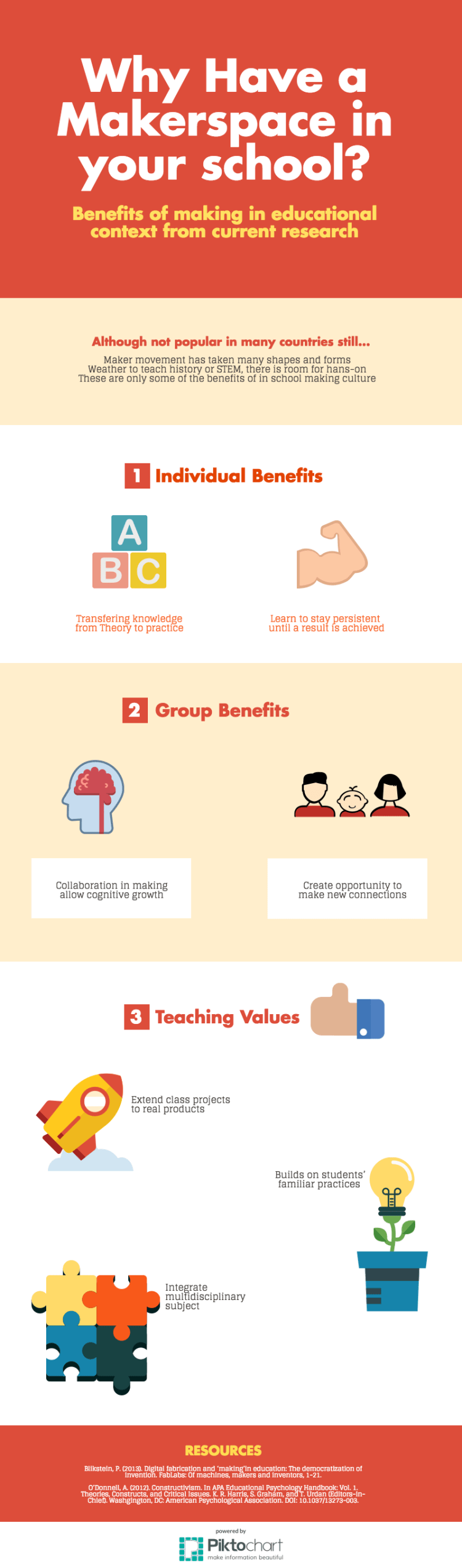
Why Makerspace in School – An Infographic

It is arguable what technology might serve the educational quality, as it is highly dependent on the design and adaptation to the education goal. However, there are a few things we are sure of based on research. Although Maker Movement is not exactly new, the idea of open creation spaces that promotes sharing is. Moreover, research done in this area is minimal, yet, a lot of the case studies had shown big promises. Not only developing our students, the benefits can extend to their surroundings and community as a whole.

This is a short infographic of some of the benefits that Maker Space can add to your school.new-piktochart_18511108_fcff7d377ab069e5fb0cc5a697eccea05388ff9c

This is a link to the full size version here


Changing the Classroom Setup

In computer science subject, students use the computer lab a lot. However, they also use the classroom for a considerable amount of time for their theory lessons. I do not work in schools, but part of my job is to work closely with teachers, from training to assessment and curriculum evaluation. Hence I present this classroom configuration advice to the teachers in our program.

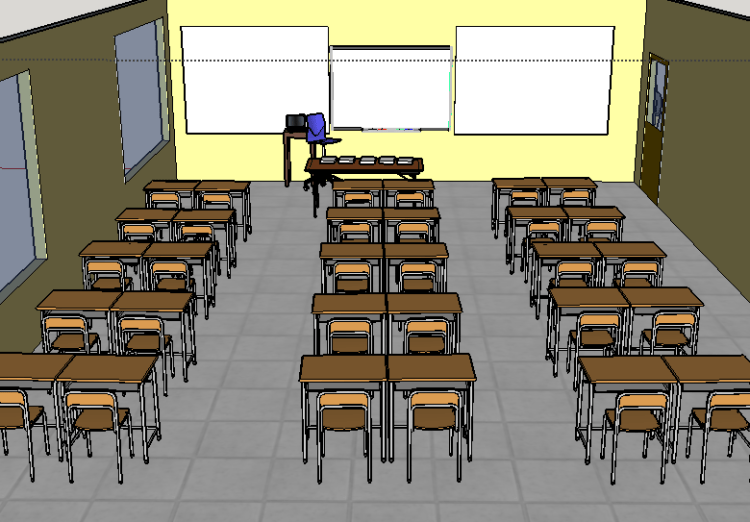
Most of the schools we work with have their classroom setup as two desks joint. It helps teachers to either let each two students work together, or they can easily fall into their individual space and work alone. It is a better “controlling” mechanism as some might call it.

Current Setup

screenshot-2016-11-21-06-31-14

We know however in this century that collaborative learning has great benefits to the students self esteem as they participate in the learning process (Johnson & Johnson 1989). In addition, collaboration in learning improves students accomplishment (Slavin 1987).

We also that the physical environment plays a major role in affecting student interaction in the classroom. It also has to be organized to support the intended learning activities (Lippman, 2010).

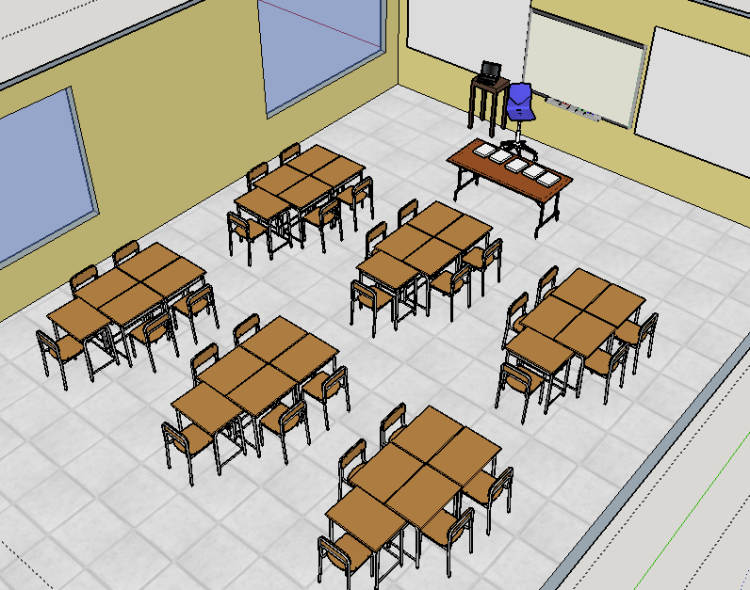
The current setup has advantage that allow teacher to re-organise it without external help or maintenance. Hence I propose the following setup that does not require budget, only some schools would require their administration approval prior to implementation.  

Proposed Setup

Screenshot 2016-11-21 06.48.17.png

This setup while still allowing the students to face the teacher when she explains, allow a variety of interactions between the students. Class activities can now be group based more conveniently to the students. Which will also help them develop their interpersonal skills in the process. More importantly, students now have better chances to achieving better scores (if the pedagogy also support collaboration) as suggested by the research.

References

Johnson, R. T., and Johnson, D. W. “Cooperation and Competition Theory and Research.” Edina,MN: Interaction Book Co., 1989.

Slavin. R. E. “Cooperative Learning: Student Teams” 2nd Ed. Washington, DC: National Education Association, 1987.

Lippman, P. C. (2010). Can the physical environment have an impact on the learning environment?.

Makey Makey and programming learning

Teaching computing in K-12 is relatively new where a lot of teachers and students still find it challenging. However, fun events such as outreach and competitions can change the norm. In addition, a good introductory workshop experience can change some perspectives.

In this 90 minute workshop, you can give your participants a hands-on experience using Makey Makey in programming learning. This activity is project based that combines making and collaboration to practice programming skills. The goal of this activity is to motivate participants (teachers in this case) to learn coding through hands-on educational game creation workshop.

Rationale: what does theory say?

The goal of this activity is to enable teachers become creators of educational games via learning how to program. Not only because it is fun, providing educational games to students has the benefit of immediate feedback, hence allowing the students to walk out of the classroom knowing the areas they should work on more (Ibrahim, 2008). Moreover, it is proven in the literature and practice that “making” in learning has a wide range benefits, from collaboration opportunities to learning persistence and transferring knowledge (Blikstein, 2013). In addition, when the learning activity is based on collaboration, we allow more cognitive growth possibilities through apprenticeship (O’Donnell, 2012).

Materials: what do you need?

  • Makey Makey kit $49
  • Alice programming environment free
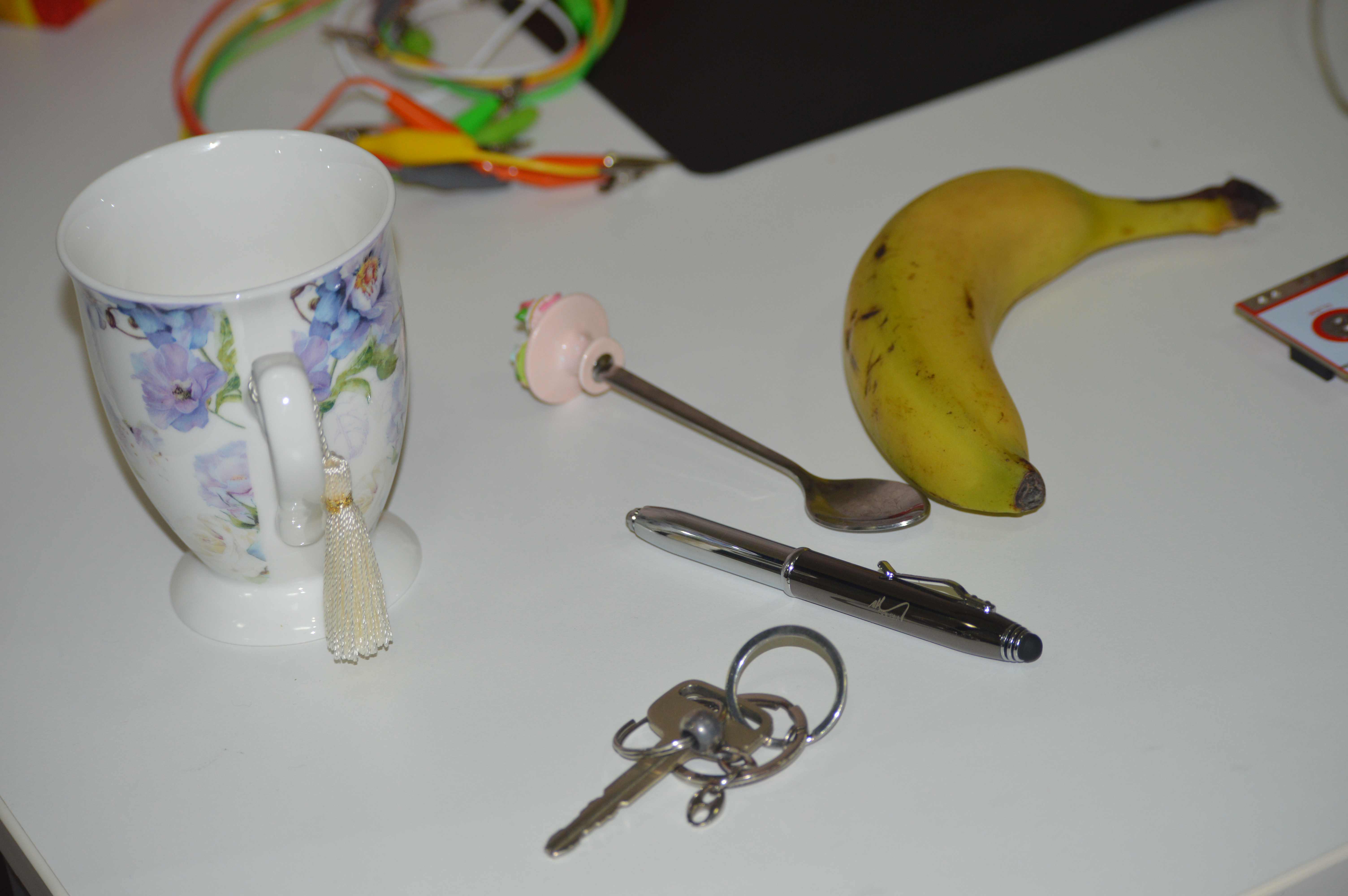
  • Some conductive materials (keys, any pencil colored art, bananas, your call!) free
  • Each two participants will need one computer (can use their personal laptop or host this in a computer cluster) free

Demo Plan

1- Your participants will need to setup the conductive materials they choose, confirm that they actually work with the Makey Makey kit.

Here are some ideas: some-materials
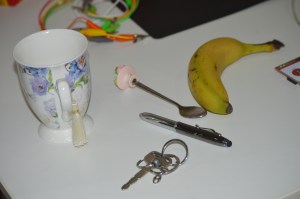
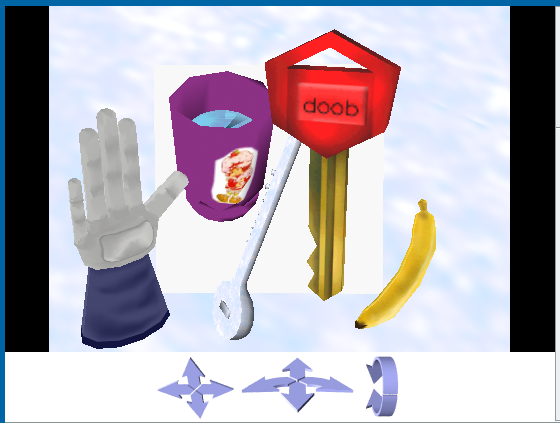
2- Find the materials illustration in Alice software. Most probably your participants can  find them, if not, they can use their imagination to pick the most matching object.
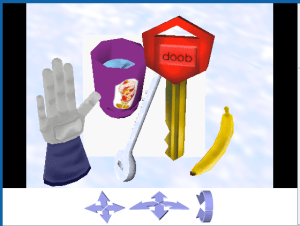
alice_objects

3- Start coding! This will be simple, we want each object in Alice to be invisible until touched. To make them invisible, right click on an object>methods> set Opacity>0.

Now all our objects are invisible in the software, we them to appear as soon as they are touched from the makey makey side.

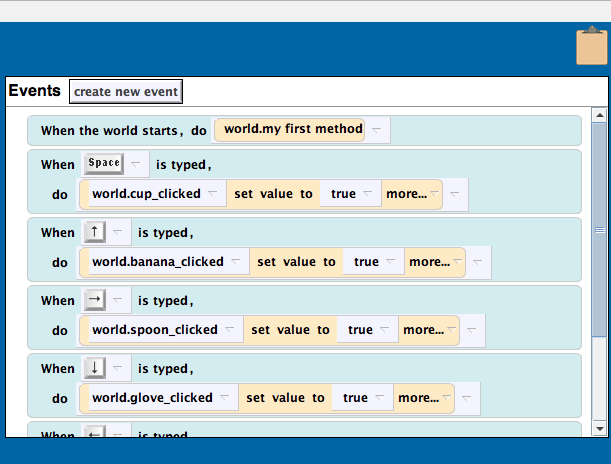
4- Now you will teach them interactive programming. This is illustrated in Events section in Alice: when a key is pressed, something happens.

Here you should take the time to explain input/output. People know that, but explain it from programming perspective. Tell them the fact that a computer is infinitely waiting for a user to click in order to take an action.

Also, illustrate to them how Alice events work, connect a banana to space on the makey then create an event: when a space is pressed, banana turns visible. Here are some examples of this:screenshot-2016-11-16-06-51-18
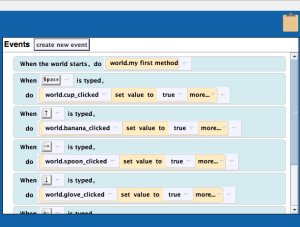
5- Now you can add sounds to your objects! On the properties tab of an object, you can import sound or record your own. Illustrate to the participants one example then let them create theirs with their imagination. Challenge your participants to link the voice to the events panel in Alice! 

Assessment  

At the end of the workshop, let each group swap their game to their neighbouring group. Also ask them to try the game with their students if they teach in KG or Primary, or to the kids in their family and see their reaction.

References:

Blikstein, P. (2013). Digital fabrication and ‘making’in education: The democratization of invention. FabLabs: Of machines, makers and inventors, 1-21.

Ibrahim, Z. (2008). Language Teaching and Technology. Linguistics in an Age of Globalization, editors, Zeinab Ibrahim, Sanaa AM Makhlouf. Cairo: AUCPress, 1-16.

O’Donnell, A. (2012). Constructivism. In APA Educational Psychology Handbook: Vol. 1. Theories, Constructs, and Critical Issues. K. R. Harris, S. Graham, and T. Urdan (Editors-in-Chief). Washgington, DC: American Psychological Association. DOI: 10.1037/13273-003.
Collaborative Learning and Makerspace

Collaborative problem solving is fun and engaging to many students. The amount of research that proves the effectiveness of this approaches is overwhelming. In this blog I focus on two publications that encourages this teaching practices

The first paper is Digital fabrication and ‘making’in education: The democratization of invention, analyses some of the history and work done in maker labs (or fabrication labs, FabLab) in education (Blikstein, 2013). In his paper, the author focuses on principles empowered by having an in school maker lab, including the benefit of allowing students to extend their various class projects instead of building prototypes to quickly rid off once graded. He also points out the benefit of creating a platform for students to easily mingle create connections with students of similar interests while avoiding the gender bias: where the maker space should interest both the intelligent student as well as those who just want to explore and try out new things. Moreover Blikstein highlights the benefit of allowing multidisciplinary subjects along with the students’ own familiar practices to be integrated creatively in the fablab.

The second paper looks at technology roles in language teaching (Ibrahim, 2008). This paper mainly reviews the literature of the WH questions of educational technology, while looking at the various applications and research that took place in the area. It then goes into the distinct language skills (reading, writing, listening, speaking) and how technology can support learning in each area. Only a language expert can tell how each of these skills is developed, hence Ibrahim highlights those areas of potential improvement by applying the suitable benefit that technology can afford, such as immediate feedback. 

Looking at Blikstein explanation of the unique collaboration experience when students find the support to carrying long term projects (p. 8):

As we will see in many of the vignettes, through several cycles of failure and redesign, students not only achieved incredibly original and complex designs, but also became more persistent, learned to work in heterogeneous teams, and became better at managing intellectual diversity.

Moreover, Ibrahim explains that collaboration activities in language classes are very useful when employed in reading activities especially for beginner level as it leads to higher students involvement in discussion. More importantly, she states that higher cognitive developments take place in a collaborative learning environment.

In a TEDx talk, Richard Culatta points out some challenges with our approaches to education, which personalized learning have the potential to solve. Collaboration in learning can be one of the ways to allow students to contribute to a task from their perspective and what they personally see valuable. Additionally, interacting with peer students have more benefits and can act as a “Cognitive Apprenticeship” as O’Donnell describes it (O’Donnell, 2012). 

It is the educator’s responsibility to create the collaborative environment to her students and leverage the advantage of students bonding. Moreover, integrating making in class has its added benefits to students’ gain and can help create more opportunities to creative collaborative experiences.

References:

Blikstein, P. (2013). Digital fabrication and ‘making’in education: The democratization of invention. FabLabs: Of machines, makers and inventors, 1-21.

Ibrahim, Z. (2008). Language Teaching and Technology. Linguistics in an Age of Globalization, editors, Zeinab Ibrahim, Sanaa AM Makhlouf. Cairo: AUCPress, 1-16.

O’Donnell, A. (2012). Constructivism. In APA Educational Psychology Handbook: Vol. 1. Theories, Constructs, and Critical Issues. K. R. Harris, S. Graham, and T. Urdan (Editors-in-Chief). Washgington, DC: American Psychological Association. DOI: 10.1037/13273-003.

How to teach storyboarding for a computing class?

Teaching computing through 2D and 3D games and animation is the trend today. One of the essential skills that helps the students in using such tools is to master storyboarding. Meaning, before they start coding an animation, it is advisable that they break down their idea into scenes, which will reflect later on in their code. This practice helps not only to have cleaner code that is easier to test, it is in fact a computer science concept: break down your problem into subproblems, solve the subproblems, then put it all together.

In this blog, I integrate maker culture with teaching. Specifically, I use 3Doodler, the pen that draw in the air and you can create plastic toys, clippers, and even fix a few things with! In addition, I use some repurpose material, along with the storyteller in me. I choose a story that is under the see, so you will see the steps and images reflects my choice, but feel free to choose your favourite environment! 

You will need:

  • 3Doodler Pen
  • cardboard box
  • decoration material (any color paper would do)
  • personal assistant. I got my nephew to help me out!

Now what to do? 

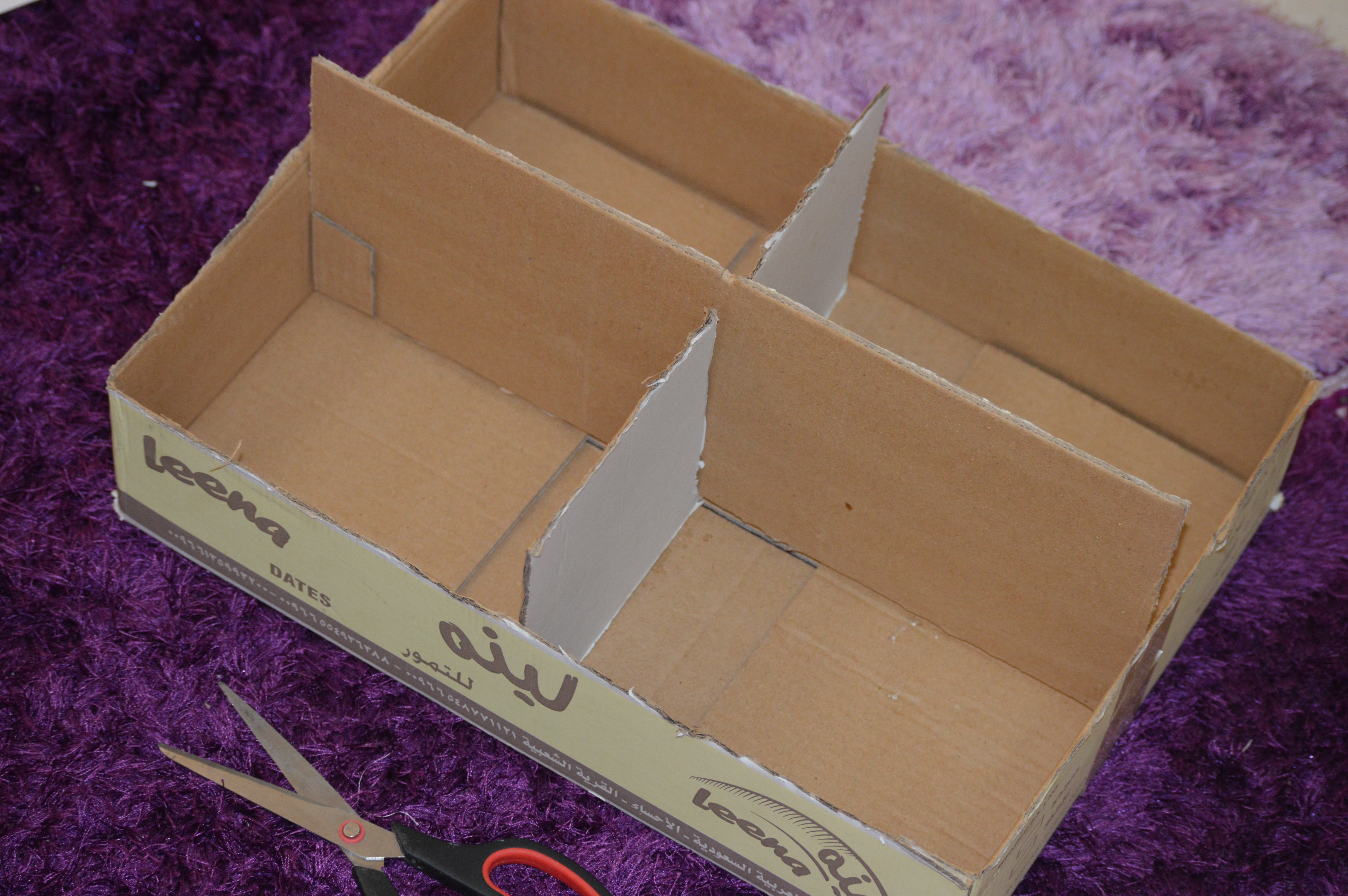
Step1. Prepare your world 

Bring your cardboard box, separate it into sections, I choose four to reflect 4 scenes of the story.

dsc_0067

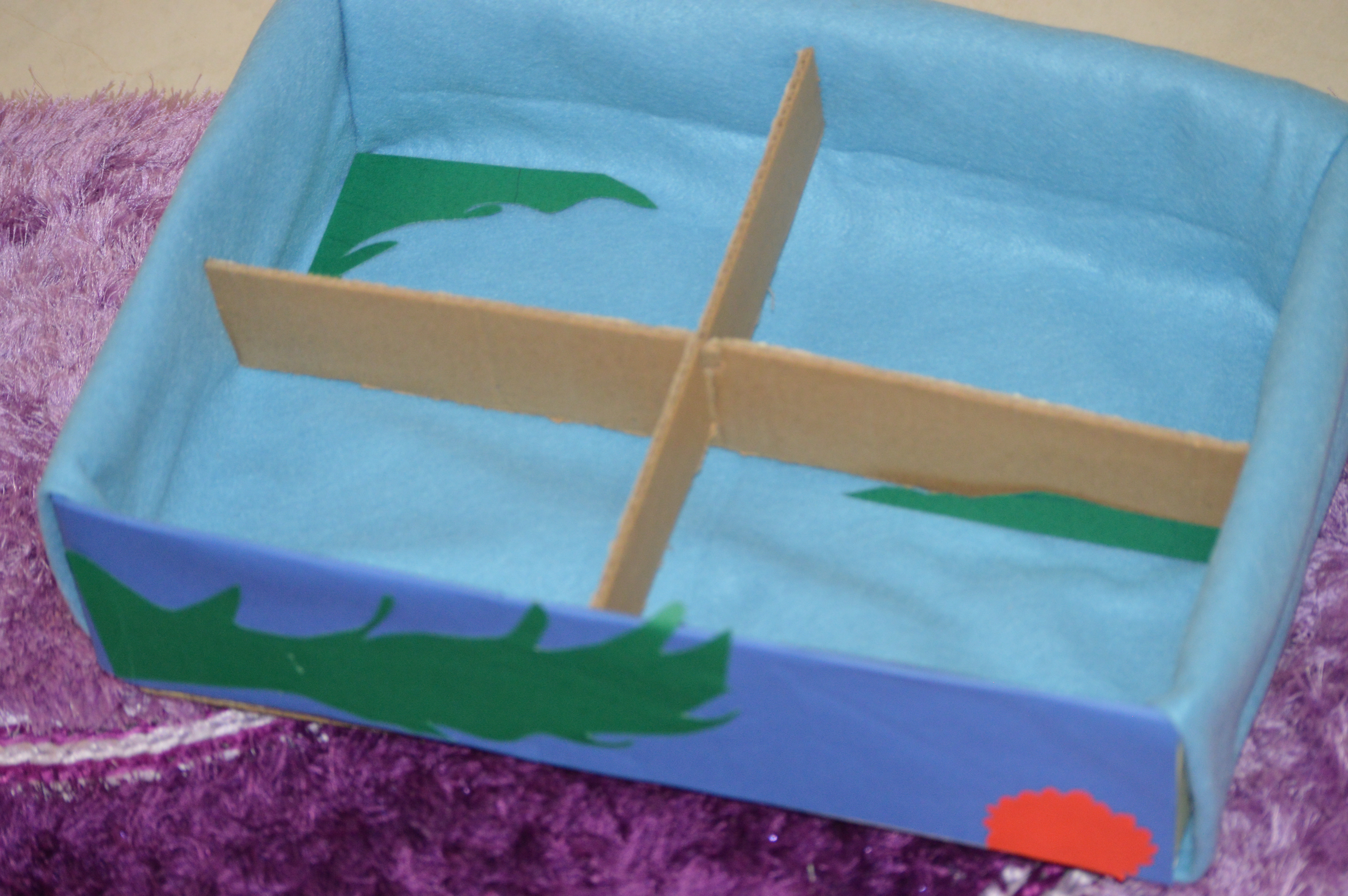
Step 2. Decorate the box

This depends on the world you choose. Sense I choose under the sea theme, I added seaweeds, plants, around the cardboard box to give it a feel of under the sea.

dsc_0069

Step 3. Manufacture your characters

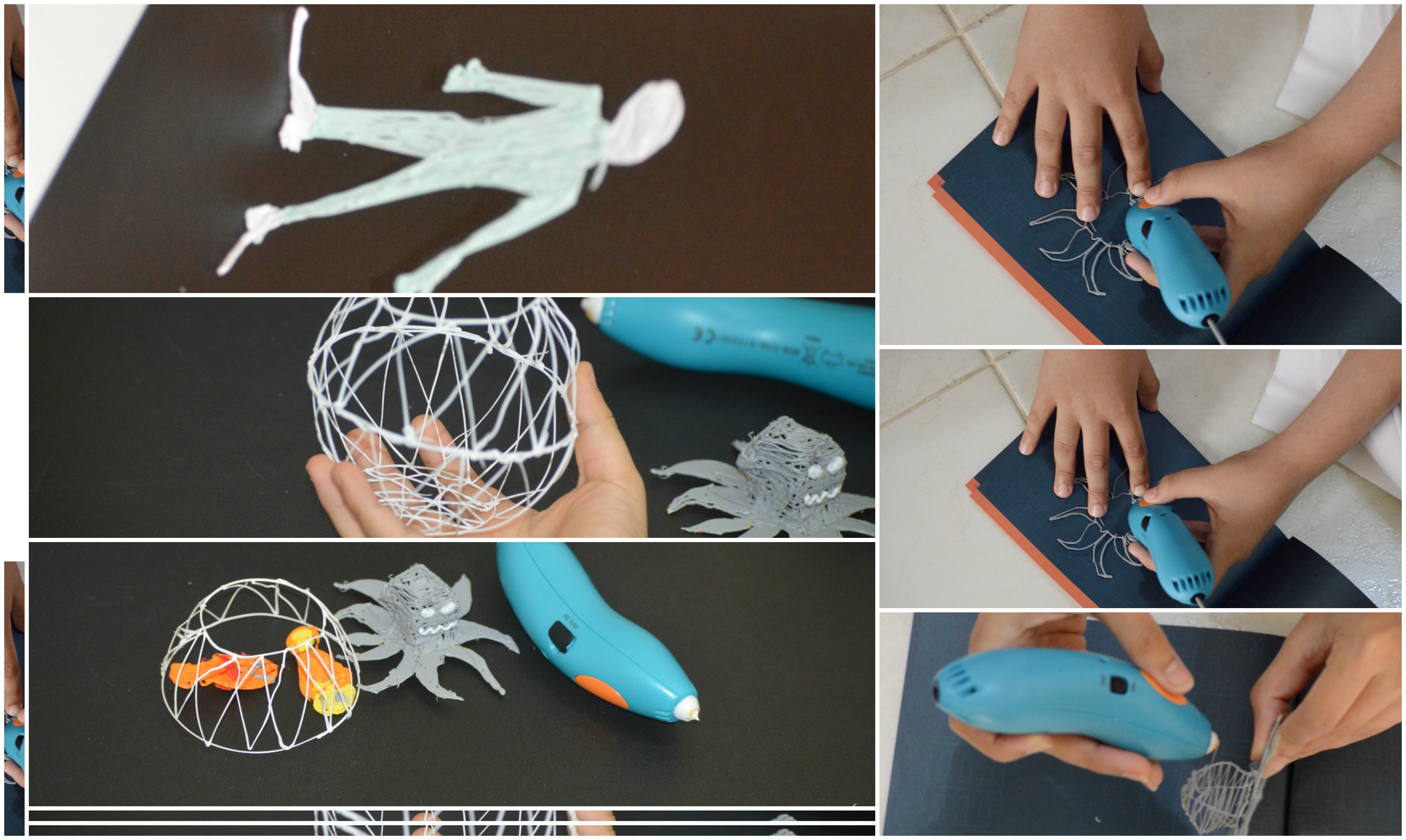
Here you will use the 3Doodler to create your objects. You need the fisherman, fishes, some sea animals and plants, and fish trap. You can use these templates in the references at the end of this blog.

collage

Step 4. Make a story

You can come up with any story. I share mine in this video 🙂

And now you are set! You can illustrate your story to the class, then have them make their own stories.

On a last note, the images illustrated in each of the steps reflect the main stages you need to accomplish to reach the final product shown in the video. The video also gives you an overall capture of the teaching goal and illustrates an example of a story that you can tell 🙂

References:

Seaweed: http://the3doodler.com/wp-content/uploads/2016/05/cool_corals_seaweed.pdf

Man figure: http://the3doodler.com/wp-content/uploads/2015/09/figureTUTORIALstencil23.pdf

Octopus: http://the3doodler.com/wp-content/uploads/2016/04/Octopus-Tutorial.pdf

Music: Memories In Photos, by AKASHIC RECORDS

The Game Makers

I love playing games and making new ones.

In the first week of CEP811 course we are talking making, remixing and creating from what already exists. Here I am taking the time to reflect on my own hobby. How game creation is an entire world of making and remixing of stuff. In fact, it is believed that the advancement of technology owes a lot to gaming. Thanks to the great demand of computer power required by heavy game engines, tech companies were pushed to advance their technologies to match what it takes to run high quality games.

Away from history, check out this super short video that takes you through some ideas on gaming. Many of us play games, or at least used to long time ago. Would it not be cool if we can create our own? You probably have attended or heard of the Hour of Code, an event that targets young students to help them code simple games and animations.

Well, if kids can do it, why don’t we join the crowd!

Althought I am a hard core programmer, I always try to be part of such initiatives because I want everyone around me to learn coding. Coding is one of (or the most fun) way of making. You literally have what it takes to code: access to a PC, to YouTube tutorials videos, and an hour to learn coding!

I hope this video convince some to join the maker culture in the game coding corner!

Resources:

Final Reflection on My First Master Course

Here I am writing the last blog for  Teaching for Understanding with Technology course. 

My view on technology in education has became broadened. I deeply value the experience of standing in the student’s shoe and learn in an online class that utilises technology in its learning activities. For example, the very first class included a video to deliver a powerful message comparing what goes in the mind of a learner and teacher using the story of Fish is Fish. This video really sticks to mind and is a great reminder for educators. I appreciate the exposure I got to the huge online repositories of tools and tips on how to create and maintain online educators communities which helps maintain a lifelong professional development. I learnt new tips on how to use Twitter to connect with classmates, how to follow hashtags and accounts was extremely rewarding and eye opening. I developed new organization practices on how to find relevant news, articles and tips on educational technologies.

Not only I find myself motivated to help teachers in my project engage in online communities, I am prepared to give them tips and some success stories of why they should. Moreover, looking at my colleagues work and how they are starting to add creative ideas to technology use in teaching inspires me to try out some of their ideas. Reading Hobbs’ approach and Bransford, Brown, & Cocking, I have more insight on how to evaluate technology aided learning: where are the rooms of improvements that technology can assume? What questions to ask oneself when evaluating a media enriched learning experience?

Lastly, I need to mention that as a developer of educational technology want-to-be, I used to believe that it is best to use tools that are designed solely for educational purposes. What CEP810 had taught me was: well, it depend. In some contexts, the way you use YouTube can result in a very rich learning experience, while an educational tool can be viewed as limited for some tasks. The design of where and why to use the tool determines the success of the learning experience. 

Big thank you to my instructors: Kimberly and Emily for the great journey!